Seven counting systems
Choose from seven supported systems, including balanced and unbalanced approaches, with the active system clearly identified.
 BLACKJACK SHOESHARK
Blackjack ShoeShark brings card counting, rule-aware strategy and count-based decision information together in one focused desktop application.
Track the shoe, practise counting systems and use strategy matched to the rules you are studying. ShoeShark is designed to keep the important information clear and immediate.
Choose from seven supported systems, including balanced and unbalanced approaches, with the active system clearly identified.
Keep running count, true count, cards seen and estimated decks remaining visible in one compact status panel.
The strategy engine works from the configured blackjack rules so the suggested play reflects the game being studied.
Study index plays alongside the live count and see when count information changes the normal basic-strategy decision.
Use the configured betting approach and current shoe information to display a suggested stake for study and analysis.
Enter other players’, your own and the dealer’s cards from a purpose-built blackjack interface.
New Round, Undo and New Game controls make it easy to progress through a shoe and correct an entry.
See shoe penetration and the configured cut-card point alongside the count information.
A dedicated Windows interface keeps the information you need together without browser tabs or spreadsheets.
Set the rules, number of decks, counting system, penetration and the options you want to study.
Record cards as the round develops. ShoeShark updates the shoe state, running count and true count as you go.
See the suggested play, betting information and relevant count-based deviations together on screen.
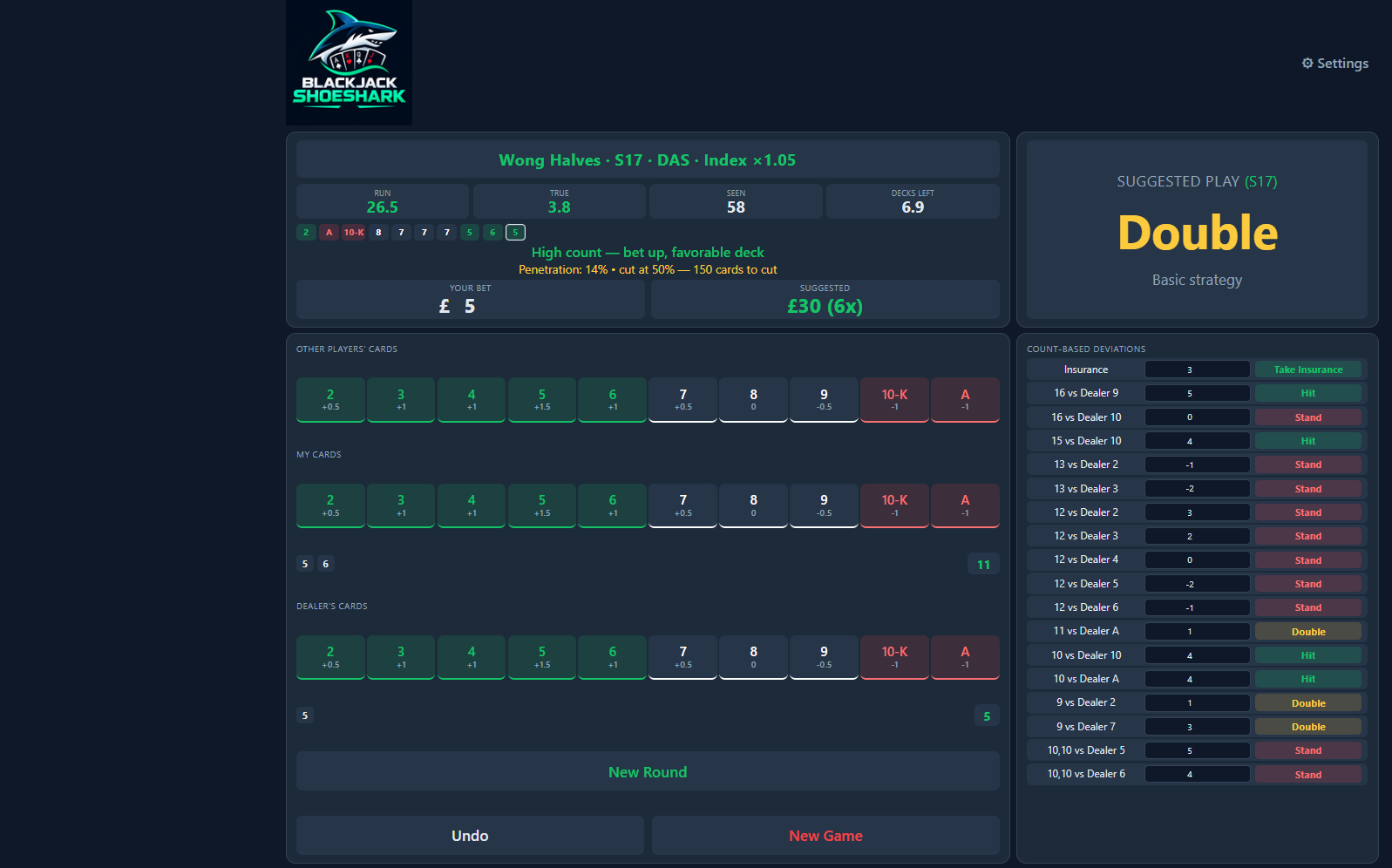
A genuine view of the current Blackjack ShoeShark desktop application.
Running count, true count, cards seen and estimated decks remaining stay visible together.
The interface keeps the current suggested play prominent while retaining the configured game context.
Count-based deviations sit alongside the shoe so you can study when strategy changes with the count.
The top panel brings together running count, true count, cards seen and decks remaining, with penetration information immediately below.
The Suggested Play panel is intentionally large and clear, so the strategy result is easy to identify at a glance.
Separate areas for other players, your hand and the dealer keep card entry organised as each round develops.
Relevant count-based strategy deviations remain alongside the main game area for study and reference.
The next generation of ShoeShark is currently being developed and tested. Release, licence and download details will appear here when the Windows build is ready.
Want to know when ShoeShark is ready?
Register interestThe current interface displays running count, true count, cards seen, estimated decks remaining, penetration, suggested play and count-based deviation information.
Version 3.0 is currently in development. Features, pricing and system requirements may change before the commercial release.
No. Blackjack involves risk and variance. ShoeShark is analysis and training software and does not guarantee gambling results.
No. ShoeShark does not accept wagers or operate casino games.
Users are responsible for complying with the rules and terms of any casino, website or jurisdiction. Some operators prohibit software assistance during play.
The initial product is being developed as a Windows desktop application. Final system requirements will be published before release.